Featured

Welcome to My Blog

“The more that you read, the more things you will know. The more that you learn, the more places you’ll go.” -Dr. Seuss

My initial thought about using web technologies in the library was to go  for it. The more that I can push the library into the 21st century, the more relevant and current the library will stay. There are several roadblocks that became more and more obvious the more I thought about it though. When dealing with elementary students ranging from the ages of 5-11, there are several federal laws that need to be followed to protect the students. The technology skills of these age ranges are also a challenge that needs to be remembered. However, if I look past those two issues. There are ways and technologies out there that I can utilize in the classroom.

I would like to start a library website that students will be able to post and reply to each other. My first thought is to create a Google Site, since my district uses the Google Suite of tools. The students all have individual accounts and it would seem to be a seamless transition. I would incorporate this technology during the students check out time. It would initially not be part of my lesson, but an extension of the students free 10 minutes in the library. I would give students the chance to write reviews about the books they read, and potentially create short book review videos on  Flipgrid and post them on the Site. I would like to have them displayed on the two TV’s located in the Library, so it would give students from other grades and classes to see what their fellow peers were reading. I have solid ideas, now time will tell if I can successfully implement them or not.
Genius Hour-20% Time

Genius Hour is a student directed inquiry on a question of their choice. During the genius hour/20% time students would research a project of their choice and create a project with their information to then be presented to an audience. I see this being beneficial to creating lifelong learners and showing students that their interests matter. Students are given the freedom to become critical thinkers on something they are passionate about. It is also beneficial for exploring resources available to students today. There are so many great technologies for students to utilize by completing a genius hour project, that it would expand their knowledge of such technologies. 

Some potential struggles with completing a genius hour is students who do not seem interested in a project of this nature. With this being more of an unstructured learning time, students may waste their time rather than completing what is needed. I can also see a struggle with teachers finding the time to implement this into their curriculum. I know that as a librarian and only seeing students once every 4 days for 40 minutes, I would not have the time to do this type of learning. I am sure that many classroom teachers would feel the same way. 

Skype and Google Hangouts for Professional Learning

I was able to connect with Kirk on Google Hangouts. We were able to chat about different uses for using these tools in education. Google hangouts was a very easy platform to utilize. All you needed was the website on your computer or app on your phone. If you were someone with a gmail account already, then using the features just took a click of a button. Google can then access your contacts or you can give someone your phone number or email and you are connected. Through Hangouts you can message through text, voice or video.

I could see the video aspect of either tool as a connection tool for students to chat with other peers across the country or world. They could also go on virtual field trips using this feature as well. This would give students access and experiences to different ideas and cultures that they would not have been exposed to before. In a online classroom, this could also give students time to connect and get to know others in their class. This would help develop more of a regular classroom environment. Professionally, Skype or Hangouts is a great way to connect with other professionals or experts around the globe. It is a very easy way to share thoughts and ideas with others.

One way I would like to use Skype or Hangouts to find other libraries in Pennsylvania and connect both group of students. I would do this around the time that I am doing the Pennsylvania Younger Readers Choice Award. This is when my students read a selection of books and vote on their favorite. I would connect the libraries and see what the other students thought was their favorite story. This would give my students a chance to voice their opinions and also hear the opinions of others from a different place in PA.

Using Twitter for Professional Learning

Many people use Twitter to mindlessly share their personal ideas with the world. Twitter limits user to 140 characters per tweet, however this can be just enough to get an idea across. School, students, teacher, journalists, leaders all across the world use Twitter as platform to share information. The information shared by these users can be found by following them or searching for certain hashtags. Searching hashtags can the be the equivalent of a Google search. This allows users to easily search for ideas and topics related to educational topics.

5 Reasons to use Twitter for Professional Learning

  1. Tweeting out school information- From homework assignments to field trips to special school events, twitter can keep parents connected to their child’s school new and information.
  2. Gathering educational resources- Sometimes teachers are looking for new and interactive ways to teach a topic. Twitter can be a resources for finding those new ways. With a simple search, you can be flooded with a hundred different examples and ideas.
  3. Follow People/Groups- Users can follow people or companies relevant to their subjects. For example, I can follow popular authors and find out when they are releasing their newest books, or find activities relating to certain books. I also can follow Journals who review books, so I can develop my collection.
  4. Connect with the Community- Educational user can tweet out public school events or projects that students created, to try to gain interest and support from the community. This would be a way of connecting education to the outside world in your community.
  5. Connect Classroom- Teachers can connect their classroom and students to someone across the globe. This would create a collaboration between teachers and students that they would have otherwise missed out on. This would emerge not only students but teachers in different cultures and customs.

5 Struggles with using Twitter for Professional Learning

  1. Privacy Concerns- Protecting your personal privacy can be a major concern for educators. Students, parents, administrators and many others could find their twitter handle and follow or message them can be a concern. That is why when creating an account it would be smart to have a separate educational one and a personal one, if you were going to use for more than educational purposes. You can also set your privacy settings to private, so you have the power to deny requests to follow you.
  2. Too much information- This is a concern for many people on any social media platform. There is so much information out in the online world, that it can become distracting to many. One way to limit the information is to use the hashtag search, so you are only getting relevant to what you want to find.
  3. 140 Characters- Being limited to 140 characters can be very challenging to some educators. It is in many educators natures to fully explain our ideas, which does not necessarily work on Twitter. However, users could share multiple tweets or add a link to the information.
  4. Protecting Students Privacy- There may be some struggle in know what is and is not appropriate to share with student pictures or created work. Personally, every year I get a list of students who are and are not allowed to have their picture taken or any of their information shared. If this is not something that your school does, then you could always develop a permission slip for parents to fill out. This would allow parents to know exactly how you are going to use Twitter in the classroom and with their students.
  5. Twitter streams are constantly updating- This can be challenging for your users to follow, if you are posting tweet after tweet since it updating frequently. This does not allow for back and forth dialogue to be created between users or for the content to be easily saved.

Podcasts in Education

Personally I never listen to podcasts, I just don’t find the time to do so. After exploring I struggled to find any podcasts really relevant to what I do as an educator. I found one podcast, but it has not had any added episode since 2014. Most of the examples I found were related to public libraries or secondary level libraries. I did find an episode from Listen Notes, called How to Set Goals for Your Library This Summer from 10 Minute Teacher Podcasts. 

In this episode elementary librarian Amanda Johnson goes through the top 5 things she does in the summer to add to her library. So much of what I do is more than teaching students and she listed some really good examples to things to do over the summer to get ready for the new school year. Her first things was collection development. It is important to see what needs there are for a libraries collection. Taking the time over the summer to dive into this, allows librarians to customize their book orders for the new school year. Amanda introduced a new technology as her second goal. It is a resource called Wakelet. This is a resource that allows users to create a digital portfolio, share resources with students and bookmark frequent websites. This sounds like a great resource and one that could be beneficial to linking students to popular sites in the library. 

Another goal she sets is to work on collaborating with teachers. The library can be an extension of the classroom by connecting the content. This is an important goal for the library and one that I could work on. The more that students are hearing common vocabulary across multiple platforms allows them to connect it to all aspects of learning. A big thing Amanda talked about is exploring the tools that are offered through the school district. This is something that I feel I have done a pretty good job at doing so far. Her last goal was to develop and read a summer reading list. Many students think that all librarians do is read books all day, however, I rarely have time to pick up a chapter book and read. This is something that I do need to work on, so I have current knowledge about what is popular right now. 

I could see using Podcast in the classroom in a secondary level, but not entirely sure how they could be easily utilized in an elementary library setting. If anyone has some ideas, I would love to hear them!

Flickr in the Classroom

Flickr could be used in the classroom in many different ways. Flickr is a photo sharing site that allows users to store their photographs online as well as edit photographs. Users have a choice to keep their photographs private or share them with the public. A good place to start with Flickr is teaching students about intellectual property and the correct way to either give credit properly to the creator or how to use the Creative Commons section. The Creative Commons area of Flickr would useful for students when they are creating presentations or need to use photographs for assignments. This is how I would primarily utilize Flickr in the Library. The creative commons could also help educators when creating lessons that would benefit from the use of photographs. This is just one example of how Flickr could be useful in the classroom. Some other examples for classroom use of matching or identifying photographs to their category, artist, or geographic places. Students could create online portfolios and create a collaborative work environment. There are many possibilities for Flickr use in the classroom and some good resources with examples listed online.

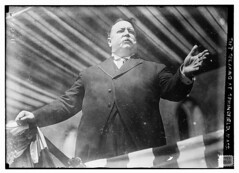
Specific Example: 5th grade students research one of the early presidents, then create a Blabberize speech using a picture of the president. I would have students get their photograph from the Creative Commons section from Flickr.

Bain News Service. (1912). Taft speaking at Springfield, Mass. [Photograph].
     Retrieved from https://www.flickr.com/photos/library_of_congress/2516566660/
     in/
     photolist-4Qo4Am-4ibC6E-4XmNGW-4XhwnF-4Z8kwT-4Bh5uH-9v4g7s-6tTi7P-4Bh5Da-UeaqsB-o
     wp5Ca-ow7Y9B-odg9jX-7iEWZP-4Ga1zb-4G5PDX-677uaV-NGZHFW-4Evkbg-59xvuv-6dmXqL-od7SP
     A-od9KK1-69Ctwf-4icXHY-4icX8u-owsEcf-oxEc6x-oeYcKq-owswTh-od9WmE-4TPWFF-oeJXWi-ow
     7haw-osodVu-oudBMA-4i8Ru4-ow2SMY-ovsBkP-owZ6nM-odtkwS-ovRU7Q-xp7ZwM-sGu1iW-tn6mAB
     -oucAvG-oeRGob-oepPfZ-owGmMP-ouMpgk

Learning Activity 5-1

How does the idea of everyone sharing knowledge in a collaborative environment affect the model of teaching and learning?

The traditional school view of students at desk, pencil and test days are changing with today’s world and innovations. A collaborative environment is effecting the model of teaching and learning. A collaborative environment allows students the chance to openly share their thoughts and ideas with each other. This approach allows different point of views and a diversity of backgrounds to respond and collaborate with one another so that they are building their framework of knowledge with different perspectives. They are no longer just sitting and listening to a lesson and then responding to a written prompt. There are choices for students giving them more of a voice in the classroom. A collaborative environment for teachers allows lessons and concepts to easily be shared across classroom and grade levels. The teachers role in the classroom has changes as well. They are no longer just the “teacher”, the role has transformed into that of a facilitator or coach. The teacher is not the main source of knowledge but gives the students the tools and resources to solve their problem or guide their learning. A collaborative learning environment is a teaching and learning model of allowing students to become the transmitters of their own knowledge through talk and action. Teachers to assume the role of facilitator, creating an environment where they can take a step back and guide student learning.

Social Bookmarking Lesson

Original Lesson

E.Q.What do I want to learn?
Obj.Students will complete research on their
selected tribe
Getting StartedStudents will get into their groups and
find their tribes books
VocabTribes, customs, food, festivals,
nickname
Activities1.Students will work cooperatively with
their groups to research their tribe
2.Allow 10 minutes for book selection
MaterialsTribe books, worksheets, websites

Revised Lesson

E.Q.What resources will help me complete my
research?
Obj.Students will compile a list of 5 reliable resources on Diigo with information about their native american tribe
Getting StartedStudents will get into their groups and log in to
their computers and open Diigo
VocabTribes, customs, food, festivals, nickname, shelter
ActivitiesStudents will work cooperatively with their groups
to each find 5 reliable resources about their
specific native american tribe
Students will add their resources to
their groups Diigo so all resources are located in
one place
Allow 10 minutes for book selection
MaterialsChromebooks, websites

I chose this particular lesson because I usually give my students their resources that they can use. This would allow the students to try and find their own resources along with work on their website evaluation skills. By using Diigo, the students would be able to create a collaborative list of bookmarked websites for them to use for their research. 

I think that I may run into problems with my students saving websites that are not reputable resources for their research. However, that could be used as a good teaching tool to review how to tell if a website is good or not. This lesson would allow students more freedom and responsibility for their research project. 

RSS Feeds

RSS feeds are not something I would typically think about using in an elementary library setting. However, after reading some of the uses for an RSS reader, I think that I could possibly use it for compiling resources for my students when they are conducting their research units. I require 3-5 graders to complete different research projects throughout the school year and an RSS reader could be one way I present their resources to them. 

Some of the RSS feeds, I am currently following are Free Technology for Teachers, I think that this will be a great resource for me to be constant up to date on current free technology available. Another feed I decided to follow was We Are Teachers. I already follow them on Facebook, but this way I can have their resources and ideas in one education place. The next feeds I found all have to do with what I teach and do in the library. I decided to search “teacher librarian” and found a blog that while is not updated regularly it does have past posts about MakerSpace ideas that may be useful to me in the future. My next search term was “Elementary Libraries”, I found a current blog titled “Teaching in the Elementary Library.” This resource had lesson plans and I am always looking for new ideas and ways to present things in the library. My last search I did was “Picture Books.” Here I found a wonderful blog titled “Let’s Talk Picture Books” this particular blog was recently updated and some great lists of new picture books. I am always on the hunt for the newest and best reads for my students. 

Design a site like this with WordPress.com
Get started